LDK-1
FOR MPC · INSTALL GUIDE
My free drum plugin, right on your MPC. No laptop. 32 pads, Shuffle, Lock, Soft and Drive, with the free Starter Kit inside. Own any of my drum kits? They play in it too, and you don't buy them again (page 4).
MPC LiveLive IILive IIIOne / One+X / X SEXLKey 37 / Key 61Force
Needs MPC OS 3.10.1 or newer. Questions: info@prodbyldre.com
Always up to date: the newest version of this guide, with any fixes, is at ldk1.prodbyldre.com/mpc-help
INSTALL (5 MINUTES)
Do these once. After that, LDK-1 is in your MPC's plugin list like any other instrument.
- Update to MPC OS 3.10.1 or newer.
Use the inMusic Software Center on your computer, or update over Wi-Fi from the MPC itself. Older versions can't load plugins.
- Turn on plugins.
Menu›Preferences›Enhancements, then switch on Enable Enhancements and External Plugin Support. While you're there, Unlimited Plugin Instances is worth turning on too.
- Unzip the download on your computer. Inside is a folder called
L.Dre - VST - LDK-1 and this guide.
- Copy that folder to the MPC, into a folder called exactly
VST2 Plugins at the top of a drive.
The VST2 Plugins folder isn't there yet: you make it. Open the MPC's drive on your computer, make a new folder right at the top (not inside another folder) and name it exactly VST2 Plugins.
- Internal drive (best): connect the MPC to your computer with its USB cable and choose Computer Mode on the MPC (it asks when you plug in, or find it in the Menu). Not Controller Mode: that one is for the MPC software and doesn't show the drive. In Computer Mode the MPC's drive shows up on your computer like a USB stick.
- SD card: put the card in your computer, copy, put it back in the MPC.
Your MPC's drive
└─ VST2 Plugins
└─ L.Dre - VST - LDK-1 ✓ the whole folder, right here
├─ Content
├─ Plugin Skins
├─ VST
└─ plugin.json
Not one folder deeper. VST2 Plugins › LDK-1 for MPC › L.Dre - VST - LDK-1 won't show up: the MPC only looks one level inside VST2 Plugins. And copy the folder itself, not just what's in it.
- Restart the MPC. It looks for new plugins when it starts.
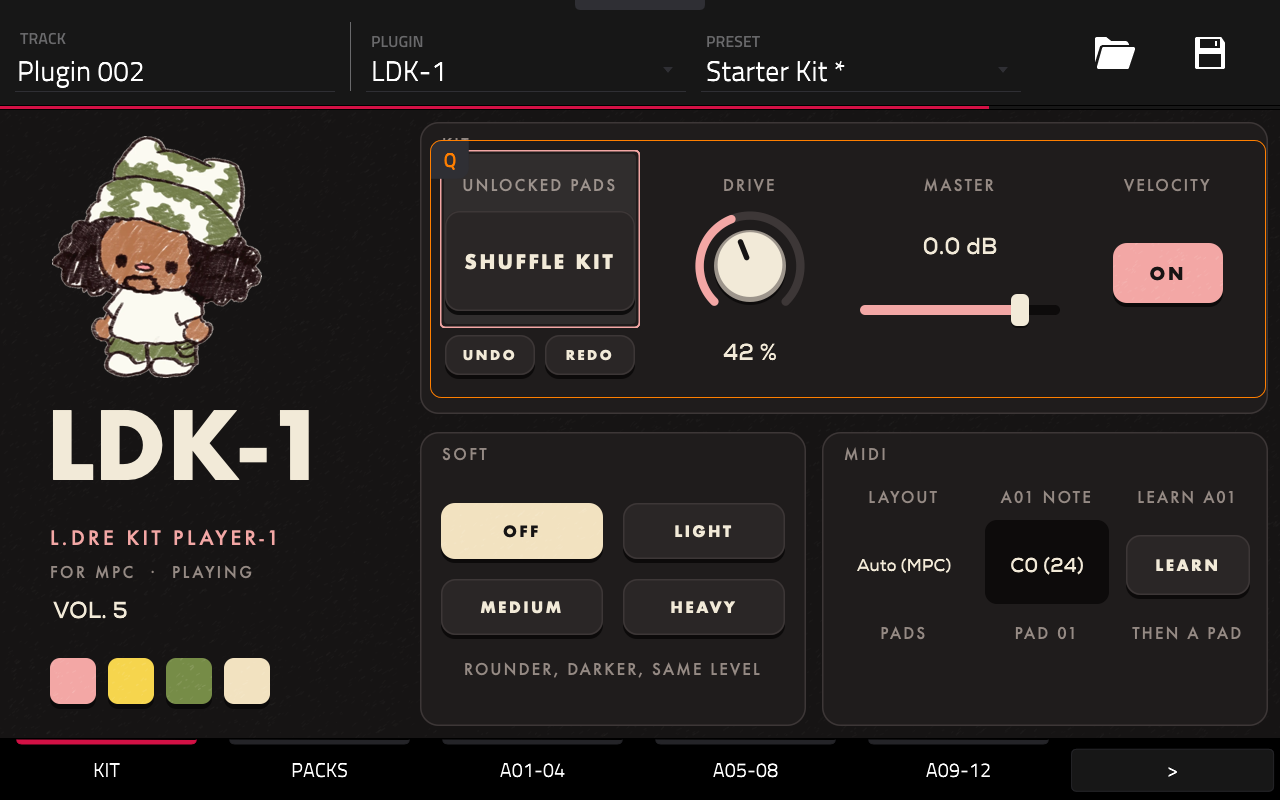
- Load it. Make a new track and choose Plugin, then in Sounds›Instruments pick LDK-1 and hit Edit Instrument. You'll see the KIT page with the character.
USB sticks: some MPCs won't run plugins from a USB stick. If LDK-1 doesn't show up from one, put it on the internal drive or an SD card. (Your drum kits are fine on a USB stick: see page 4.)
PLAYING IT
THE PAGES
- KIT: SHUFFLE KIT gives every pad that isn't locked a new sound from the same kind (kicks stay kicks, open hats stay open). UNDO / REDO step back and forth. DRIVE warms the whole kit, MASTER is the volume, VELOCITY on means softer hits play quieter.
- SOFT (Off / Light / Medium / Heavy): rounder, darker drums at the same level. Shuffle then picks from the mellower sounds.
- PACKS: your kits. Tap one to play it.
- A01-04 … B13-16: one row per pad. Its SOUND, LEVEL, MUTE, LOCK and SHUFFLE. A locked pad keeps its sound when you shuffle the kit.
The Q-Link knobs next to the screen control the controls next to them. Turn a pad's SOUND knob to go through the whole kit.
WHICH PAD PLAYS WHAT
- Bank A, pads 01–16: kicks, snares, hats and open hats, in four rows.
- Bank B, pads 03–16: percussion and foley. On the MPC's normal pad layout, bank B pads 01 and 02 play the same notes as bank A pads 15 and 16, so they play those two sounds.
- Set the track's Notes to Chromatic, or play from a keyboard? LDK-1 notices by itself (Pad Layout: Auto on the KIT page).
- Pads start on the wrong sound (a keyboard, another layout)? On the KIT page tap LEARN, then hit the pad or key you want as the first pad.
Your kit is saved with your project and comes back when you open it.
ON A FORCE
The Force shows plugin tracks in Note Mode (the keygroup-style 8x8 grid), not as drum pads. Set it up once:
- In Note Mode set Type: Chromatic and Pad Rows: Continuous, so each pad goes up one note.
- On LDK-1's KIT page tap LEARN, then hit the bottom-left pad.
- Your 32 sounds sit on the bottom 4 rows, 8 per row: A01-A16 on the bottom two rows, B01-B16 on the next two.
YOUR L.DRE DRUM KITS
Own any L.Dre Drum Kit (Vol. 1 to 8)? It plays in LDK-1 on your MPC, and you don't buy it again.
Your regular kit folder won't load on the MPC, not from your computer and not from an SSD. LDK-1 for MPC needs each kit's MPC pack: a zip ending in - LDK-1 MPC. It's free if you bought the kit.
- Get your MPC packs. Bought before Nov 13, 2026: go to ldk1.prodbyldre.com/#packs, enter the email you bought with, and I'll email you a link to the MPC packs for every kit you own. Bought after: the MPC pack is in your order's download, next to the kit. Deluxe owners get the Deluxe pack.
- Copy the pack's folder into a folder called exactly
LDK-1 Packs at the top of any MPC drive: internal, SD card or USB stick.
Your MPC's drive
└─ LDK-1 Packs
├─ L.Dre - Drum Kit Vol. 8 - LDK-1 MPC
└─ L.Dre - Drum Kit Vol. 4 - LDK-1 MPC
- Open PACKS in LDK-1 and tap the kit. It shows up within a few seconds, no restart needed. Each kit starts on my own favourite kit; SHUFFLE KIT does the rest.
Kits you don't have yet show as LOCKED with a QR code: scan it with your phone to get that kit.
IF SOMETHING'S OFF
| What you see | What to do |
|---|
| LDK-1 isn't in the plugin list | Check External Plugin Support is on (step 2) and you're on MPC OS 3.10.1 or newer. Check the folder is directly inside VST2 Plugins and still called L.Dre - VST - LDK-1. On a USB stick? Move it to the internal drive or an SD card. Then restart the MPC. |
| My kit says LOCKED but I bought it | LDK-1 needs the kit's MPC pack, not the regular kit folder. Get it free at ldk1.prodbyldre.com/#packs with the email you bought with, then step 2 above. |
| A kit isn't on PACKS | The pack's folder goes directly inside LDK-1 Packs at the top of a drive, not one folder deeper. Wait a few seconds, or open LDK-1 again. |
| Pads play the wrong sounds | KIT page: Pad Layout on Auto, or tap LEARN and hit your first pad. |
| No sound | Check the pad isn't muted and its LEVEL and MASTER are up. Velocity on? Hit harder. |
| The MPC freezes or won't start | Take the L.Dre - VST - LDK-1 folder out of VST2 Plugins (Computer Mode) and restart. Then email me what happened. |
| Remove LDK-1 | Delete the L.Dre - VST - LDK-1 folder (and LDK-1 Packs if you like). |
Akai doesn't test or support plugins from other makers, so save your projects as you go. LDK-1 never goes online and only reads its own sounds and your LDK-1 Packs folder.
Stuck? info@prodbyldre.com · More: ldk1.prodbyldre.com